
Cloud-Based Access Control System vs On-Prem & Standalone

The readers and locks at your doors get all the attention, but they are only the visible half of an access control decision. The half that quietly shapes your cost and your headaches is invisible: where the system’s brain actually lives. Run it as a cloud-based access control system reachable from a browser, keep it on-premise on servers in your own basement, or let each door fend for itself as a standalone unit. That single architectural choice ripples through pricing, daily management, and how gracefully the whole thing grows.
We install all three flavors around New York, and we have no dog in the fight — the right answer genuinely changes building to building. Here is the comparison laid out plainly.
Boiled down: cloud lives online and shines at remote management and multi-building portfolios; on-premise keeps everything local for owners who want their data under their own roof; and standalone covers a door or two with no central software whatsoever. For the typical multi-tenant New York building, cloud tends to win, but not always.
Three architectures, one sentence each
Before the weeds, fix the core difference in your head, because everything downstream flows from it. The models part ways over one thing: the place management happens.
- Cloud-based: The software is hosted online by the provider and opened from any browser, anywhere.
- On-premise: The software runs on servers the building owns and babysits, with the data staying in-house.
- Standalone: A single door is set up at the device itself, answering to no central software at all.
Each lines up with a different size and temperament, which the next sections make tangible.
One reassurance up front: these are not warring technologies so much as 3 ways to run the same door hardware. The reader, the controller, and the lock can usually sit behind any of them. What shifts is where the decisions and the records live, which is why this is really a question about how you want to operate over the next 5 to 10 years, not about which gear is best.
Cloud-based access control system, up close
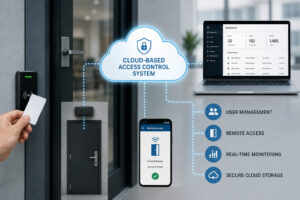 A cloud-based access control system moves the management off a machine in a back office and onto the internet, so whoever runs it works from a laptop on the couch or a phone on the subway. This is the architecture that has eaten the most ground lately, and the reasons are not mysterious.
Under cloud management, granting a tenant access at 9 at night, pushing a mobile credential to a new resident, or pulling last week’s entry log all happen wherever the manager happens to be. The provider handles the updates, the backups, and the uptime, and a company holding 12 buildings oversees them from one screen. The catch comes in two parts: a recurring subscription, and a reliance on connectivity — though any system worth buying keeps the doors working locally when the line drops. For owners who prize remote control and minimal upkeep, little else competes.
The remote part is hard to oversell for a manager with a full plate. Clearing a contractor in for the morning, killing a lost mobile key in 30 seconds, glancing at who badged through the garage overnight, all of it from a phone, no trip required. For an outfit running 5 or 10 properties, that convenience does not add up so much as multiply, week after week.
On-premise access control, up close
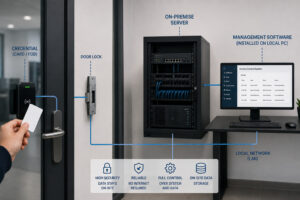 On-premise access control keeps the entire apparatus inside the building, with the management software humming on local servers the owner controls. It is the old-guard enterprise way, and it still earns its place.
Because nothing leaves the property, the organization holds its own data and answers to no outside provider’s uptime — a real comfort for operations bound by strict internal rules. The money flips the other direction from cloud: a heftier upfront spend on servers and licensing, plus the standing duty to patch, update, and back it all up with staff or a contractor. Remote access is doable but takes setup. On-premise makes the most sense for larger institutions with a real IT bench and specific control or compliance demands pulling the strings.
Standalone access control, up close
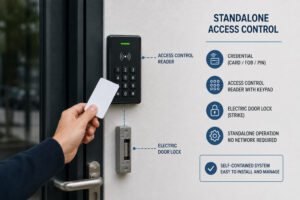 Standalone access control is the bare-bones model, built for a single door or a small clutch of them with no central software in the picture. Each lock keeps its own counsel.
A standalone reader stores its own roster of valid credentials and renders its own verdicts, programmed right at the unit. No subscription, no server — which keeps it cheap and self-sufficient for a tight need like one office door or a lone storage room. The strain appears the moment you scale: minding credentials one door at a time turns tedious, and there is no single view and no remote reach. Standalone is a fine answer to a small, fixed question and a poor one for a building with ambitions.
The arithmetic sours fast as doors pile up. Hand-reprogramming 10 separate locks every time a tenant leaves is tedious and mistake-prone, and there is nowhere to see the whole picture. What feels economical at 1 or 2 doors becomes a weekly chore at 20, which is precisely why standalone belongs to genuinely small, unchanging needs.
Side by side
Here is how the three line up on the points that actually swing the decision.
| Factor | Cloud-based | On-premise | Standalone |
|---|---|---|---|
| Where you manage it | Any browser, online | Servers in the building | At the door itself |
| Reach from afar | Built in | Possible, more setup | None |
| Day-one cost | Lighter | Heavier | Lightest |
| Cost over time | Subscription | Upkeep and IT | Next to nothing |
| Room to grow | Excellent | Good | Poor |
| Natural home | Multi-tenant, portfolios | Big orgs with IT | 1 or 2 doors |
Growing into it
If a building or a portfolio plans to expand, scalability stops being abstract and starts deciding the matter, and here the models split hard. Cloud was built to stretch.
Bolting a door, a building, or 100 new tenants onto a cloud system is a settings change, and one manager can run many sites from a single console. On-premise stretches too, but reaching further usually means more server muscle and more IT hours. Standalone barely stretches at all, since every door is its own island. For anyone minding more than one building, the gap in scalability alone often settles the question in cloud’s favor.
Safety and staying up
A fair worry about cloud is whether parking access control online is secure and dependable. The honest read is that each architecture carries a different risk shape.
- Cloud: Serious providers pour money into encryption and security, and sound systems keep the doors answering locally even when the internet sulks.
- On-premise: The data never leaves, but guarding it and keeping it up become the building’s own job.
- Standalone: Cut off from any network, which shrinks the remote attack surface but also means no central watch and no instant revocation across doors.
The uptime worry deserves a flat answer, since it scares people off cloud for the wrong reason. A well-built cloud system caches credentials at the door, so it keeps admitting valid tenants even if the internet is out for hours, then re-syncs when the line returns. The cloud handles management and records; it is not a live dependency hanging on every single unlock, and conflating the two is a common mistake.
How the bill is shaped
The models differ not only in how much you pay but in the shape of the payment, and matching that shape to your budget temperament matters as much as the total.
Cloud smears the cost across time as a subscription with a gentler upfront hit, which suits owners who would rather budget a steady operating line. On-premise loads the cost into servers and software at the start and then carries maintenance — an approach a larger organization may swallow more comfortably. Standalone is cheapest overall for a tiny job and offers none of the management value that justifies the others once a building grows. Pick the shape, not just the sticker.
A rough mental model helps: cloud keeps the day-1 outlay light and tacks on a steady fee, on-premise asks for a bigger sum upfront and then quieter upkeep, and standalone is cheap only because it does the least. Over a 5-year stretch the totals drift closer than they first appear, so the better question is which rhythm and which feature set actually fit your building.
Matching the model to the building
Pulled together, the best architecture usually trails the building. A few patterns hold up reliably.
- Multi-tenant residential: Cloud, for remote hands, frictionless turnover, and mobile credentials for tenants.
- A portfolio of buildings: Cloud, to run them all from one dashboard.
- Big institutions with IT: On-premise, where in-house control and compliance call the shots.
- A single door or tiny site: Standalone, for a simple, self-contained need.
When the call is genuinely close, the safe default for a multi-tenant residential building is cloud, because it mirrors how these buildings really run: a steady churn of move-ins and move-outs, tenants who expect a key on their phone, and managers who are seldom on-site around the clock. On-premise and standalone are answers to narrower, specific situations rather than the everyday apartment building, where cloud’s strengths line up almost perfectly with the daily grind.
Frequently asked questions
Is putting access control in the cloud safe?
With a reputable provider, yes — strong encryption and real security investment, plus local fallback that keeps valid tenants getting in even when the connection goes dark.
Cloud or on-premise — what truly separates them?
Cloud is hosted online by a provider for remote reach and low upkeep; on-premise runs on the building’s own servers for in-house control, at a steeper day-one cost.
When is standalone enough?
For one door or a handful with a fixed, simple need it works fine; it falls apart once you must manage many doors or want to reach the system from afar.
What suits an apartment building best?
Cloud, almost always — remote management, easy turnover, mobile credentials, and the option to oversee several buildings from one place.
Does cloud cost money every month? Yes, it runs on a subscription, trading a lighter upfront price for a predictable recurring fee plus provider-handled updates and backups.
Unsure which architecture fits your building? We will look at it and recommend straight. Explore our access control service, see the cloud-connected SmartPlus platform, browse the catalog, or tell us about your building.
Related Articles