
Cloud based access control system in Brooklyn
Managing access becomes more complicated when a property has multiple entrances, many users, changing permissions, or more than one location. A cloud based access control systems in Brooklyn approach allows compatible access devices to be connected with a cloud platform, giving authorized administrators and users access to management and mobile functions without relying entirely on local control at the entrance.

Customized Security Solutions
We design tailored intercom and access control systems based on your property's unique requirements, ensuring the right fit for every project.

Professional Installation
Our experienced technicians handle every stage of the installation process, delivering reliable performance and attention to detail.

Advanced Technology
We provide modern, feature-rich solutions with cloud management, mobile access, and seamless integration capabilities.

Ongoing Support & Maintenance
From system setup to long-term service, our team is committed to keeping your security solutions operating efficiently.
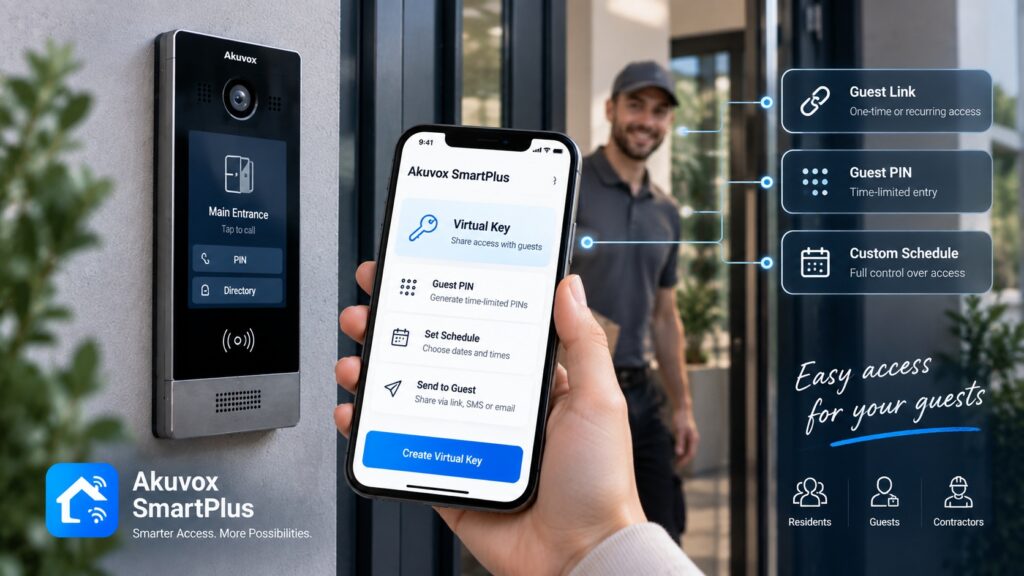
Akuvox solutions can combine access control hardware with SmartPlus Cloud and the SmartPlus App. Depending on the selected devices and configuration, the system can support mobile door opening, user and permission management, temporary credentials, Bluetooth access, and other cloud-based functions.
What Is Cloud-Based Access Control?
Traditional access control often relies heavily on equipment and management tools located at the property. A cloud-based architecture adds an online management layer that allows supported functions to be configured through a cloud service.
A simplified workflow looks like this:
Access device → Internet connection → Cloud platform → User permissions → Door or access point
The physical access device still performs the actual authentication and controls the entrance. The cloud platform provides a way to manage compatible devices, users, credentials, and permissions remotely.
This distinction is important: cloud access control does not mean that the physical security of the entrance disappears. The system still requires appropriate access terminals, controllers, door hardware, networking, and configuration.
How Cloud Access Control Works
A typical access event involves several stages:
- A resident, employee, or visitor presents an authorized credential.
- The access device identifies the credential or receives an access request.
- The system checks the applicable permission.
- If the user is authorized, the corresponding door or relay can be activated.
- The access event is handled according to the configuration of the system.
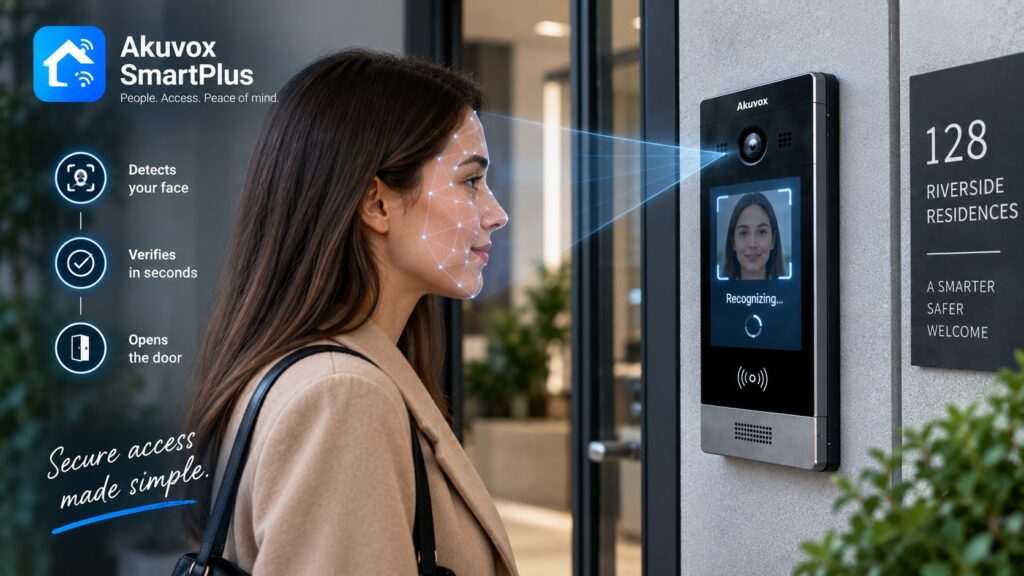
For mobile access, the user’s smartphone can become part of this process. Compatible Akuvox systems support access methods such as Bluetooth, NFC, PIN codes, temporary keys, and facial recognition, although the available options depend on the particular device.
The cloud component is particularly valuable for administration. Instead of making every change directly at the entrance, supported settings can be managed through SmartPlus Cloud.
Manage Access from Anywhere
One of the main reasons to choose cloud-based access control is the ability to manage supported access functions without being physically present at the building.
For a property manager or administrator, this can be useful when:
- A new resident or employee needs access.
- A former user should have their permissions removed.
- A contractor needs temporary entry.
- Access to a particular door needs to be changed.
- Several doors need to be managed.
- The administrator is responsible for more than one property.
SmartPlus Cloud provides management capabilities for compatible projects, including user management and access-related configuration. Akuvox also provides dedicated cloud workflows for property managers and commercial projects.
Remote administration can reduce unnecessary trips to the property and make routine access changes easier to handle.
Mobile Access for Residents and Employees
A smartphone can serve as a convenient alternative to a traditional physical credential.
With compatible Akuvox equipment and SmartPlus, users can access supported doors through the mobile application. Available methods include Bluetooth, NFC, PIN codes, temporary keys, and other functions supported by the selected devices.
This can be useful for:
- Apartment residents who prefer not to carry access cards.
- Employees who regularly use their smartphones.
- Property managers who need remote door-opening capabilities.
- Users who need a digital alternative to a physical credential.
Mobile access should be considered as one part of the overall system. The specific experience depends on the installed Akuvox equipment, network connection, SmartPlus configuration, and permissions assigned to the user.
Temporary Access Without Physical Keys
Temporary access is one of the most practical applications of cloud-based management.
A property may need to give someone access for a single visit, a specific time period, or a recurring schedule without creating a permanent user credential.
Supported SmartPlus configurations allow temporary keys to be created for visitors, delivery personnel, contractors, and other users. Depending on the scenario, temporary credentials can include QR codes or PINs, with restrictions on the doors and times when they can be used.
For example, a property manager can create a temporary credential for a contractor and limit it to the required entrance and validity period. This is more manageable than issuing a permanent access card that has to be collected later.
Cloud Access Control for Property Managers
Property managers often have to deal with a constantly changing list of authorized users.
A cloud-based system can simplify tasks such as:
- Adding residents or employees.
- Removing former users.
- Assigning access groups.
- Setting access schedules.
- Providing temporary credentials.
- Managing visitor access.
- Controlling permissions for specific doors.
- Working with access configurations remotely.
For community projects, SmartPlus Cloud supports access groups and schedules, while temporary visitor and delivery credentials can be assigned to particular doors and, where applicable, floors.
This makes cloud management particularly useful for properties where access permissions change frequently.
For administrators looking for cloudbased access control software in Brooklyn, it is important to evaluate not only the interface but also compatibility with the access terminals, controllers, intercom equipment, credentials, and doors being used at the property.
Cloud Access Control for Different Brooklyn Properties
The same cloud architecture can support different access scenarios.
Apartment Buildings
Property managers can use compatible cloud functions to manage residents, temporary visitors, delivery personnel, and access permissions. Temporary keys can also be configured for specific doors and time periods.
Office Buildings
Businesses can use mobile access and temporary credentials for employees, visitors, contractors, and other authorized users. Different access groups can be configured according to the structure of the organization.
Commercial Properties
Retail locations, professional offices, warehouses, and other commercial facilities can use cloud management when they need to administer several users or access points without relying entirely on local administration.
Mixed-Use Buildings
Properties combining residential and commercial spaces may benefit from separate access groups and permissions for residents, employees, visitors, and service personnel.
Multiple Properties
Cloud management becomes particularly valuable when an organization is responsible for more than one property. Instead of maintaining completely separate administrative processes, compatible projects can be managed through the appropriate cloud platform.
Cloud-Based Access for Multiple Doors and Locations
A single entrance is relatively easy to manage locally. The administrative benefits of cloud access become more apparent as the number of controlled points increases.
A property might have:
Main entrance → Garage → Service entrance → Elevator → Restricted area
Each point can have different access requirements. For example, residents may be allowed through the main entrance and elevator, while maintenance staff may also need the service entrance.
Akuvox’s compatible cloud configurations can support access groups, selected doors, access schedules, and temporary credentials.
For organizations managing multiple locations, the same principle can be extended across compatible projects, although the exact capabilities depend on the cloud service and system configuration.
Cloud Access Control and Video Intercom
Cloud management can also connect access control with visitor communication.
A typical scenario is:
Visitor arrives → video doorphone receives the call → resident or employee identifies the visitor → access is granted remotely → visitor enters.
The SmartPlus App supports compatible intercom functions that allow users to see and communicate with visitors and open doors from a smartphone.
This can be particularly useful for apartment buildings where residents are not always near the entrance, as well as offices where reception or employees need to communicate with visitors before granting access.
The availability of video calling, monitoring, and remote unlocking depends on the installed devices and enabled SmartPlus features.
Cloud Access Control vs. Traditional Access Control
Cloud-based and traditional access control are not simply a matter of choosing between a newer and an older technology. The right approach depends on the property’s requirements.
|
Consideration |
Traditional approach |
Cloud-based approach |
| Access management | Often performed locally | Supported management through cloud platform |
| Remote administration | Limited or dependent on system | Available for supported functions |
| Mobile access | May require additional integration | Available in compatible SmartPlus scenarios |
| Temporary credentials | May require local configuration | Can be created through supported cloud tools |
| Multiple properties | Can require separate administration | Centralized cloud workflows may simplify management |
| Scalability | Depends on local architecture | Can be convenient as users and locations increase |
Cloud access does not automatically make every system better. A property should also consider network reliability, required security policies, existing infrastructure, device compatibility, and how much remote management is actually needed.
Security and Access Permissions
Moving management functions to the cloud does not eliminate the need for carefully designed permissions.
A good access control configuration should define:
- Who can enter.
- Which doors each user can open.
- When access is permitted.
- Which users can issue temporary credentials.
- Which administrators can modify permissions.
- When access should expire.
Temporary SmartPlus credentials can be configured with validity periods, selected doors, repeat modes, and usage limits in supported scenarios.
This makes permission management just as important as the authentication method itself. A sophisticated access device cannot compensate for poorly configured user rights.
When Should You Choose Cloud-Based Access Control?
A cloud-managed solution can be particularly useful when:
- Access permissions change regularly.
- Property managers need remote administration.
- The building has multiple controlled entrances.
- Temporary credentials are frequently required.
- Residents or employees want mobile access.
- Several user groups need different permissions.
- An organization manages multiple properties.
- Video intercom and remote door opening are required.
- The property is expected to expand over time.
These cloud based access control solutions in Brooklyn can be especially practical for properties where access needs change frequently or administrators manage users from outside the building.
A local system may still be appropriate when the project has very simple requirements or when cloud management is not compatible with the property’s infrastructure or operating policies.
The decision should therefore be based on the actual access workflow rather than the cloud label alone.
How to Choose a Cloud Access Control System
Before selecting equipment, determine how the property will actually use the system.
- Number of Doors. Identify every entrance, internal door, garage, elevator, and restricted area that may require access control.
- Number of Users. Estimate the number of residents, employees, managers, contractors, and other authorized users.
- Access Methods. Decide whether users should have cards, PINs, Bluetooth, NFC, mobile credentials, facial recognition, or a combination of methods.
- Temporary Access. Determine whether visitors, contractors, delivery personnel, or service staff will require time-limited access.
- Management Roles. Establish who should be able to add users, modify permissions, issue temporary credentials, and manage access schedules.
- Intercom Integration. If visitors need to communicate with residents or employees before entry, choose equipment that supports the required intercom and mobile functions.
- Network and Infrastructure. Cloud-based access depends on appropriate connectivity and compatible hardware. Existing wiring, network architecture, doors, locks, and controllers should be considered before selecting the final configuration.
- Future Expansion. If the property may add entrances, users, or additional locations, select an architecture that can accommodate the expected growth.
Akuvox SmartPlus for Cloud Access Control
SmartPlus is the cloud and mobile component of the Akuvox ecosystem for compatible access and intercom products.
The platform can support functions such as:
- User and access management.
- Mobile door opening.
- Bluetooth access.
- Temporary visitor credentials.
- QR and PIN-based temporary keys.
- Visitor communication.
- Access schedules.
- Management of compatible doors and access groups.
SmartPlus Cloud can be used by property managers to issue temporary access to visitors and delivery personnel, including specifying doors, access groups, validity periods, and other parameters in supported projects.
SmartPlus should not be considered a replacement for the physical access control equipment. It works together with compatible Akuvox devices, and available functions vary depending on the hardware, project type, and configuration.
Get a Cloud-Based Access Control System in Brooklyn
A cloud based door access control in Brooklyn configuration can make access management more convenient when a property has multiple users, changing permissions, temporary visitors, or several controlled entrances.
Akuvox NYC offers Akuvox access control products and related solutions for properties in Brooklyn. The appropriate configuration depends on the number of doors and users, required access methods, existing infrastructure, and the level of remote management required.
Request a Quote to discuss your property and determine which Akuvox access control configuration may be suitable.
Other Services in BROOKLYN
Other Locations we Serve
FAQ
It is an access control setup that uses a cloud platform for supported management functions, allowing authorized administrators and users to manage compatible access features remotely. Physical terminals, controllers, locks, and network equipment remain part of the system.
Yes, compatible Akuvox and SmartPlus configurations can provide remote door-opening and access management functions. The available capabilities depend on the installed devices and enabled services.
Yes. Compatible Akuvox systems can support mobile access through SmartPlus, including Bluetooth and other supported access methods.
Yes. Supported SmartPlus configurations allow temporary credentials to be created with defined access periods and selected doors.
Compatible SmartPlus configurations support access groups, selected doors, and access schedules. The exact number and type of doors that can be managed depends on the equipment and project configuration.
Yes. SmartPlus supports community and property-management scenarios where residents, visitors, delivery personnel, and staff can have different access permissions.
Yes. Compatible SmartPlus configurations can combine visitor communication, monitoring, and remote door opening through the mobile application.
The exact behavior depends on the device, system architecture, and function being used. Cloud-dependent management and mobile features may require connectivity, while physical access equipment can have its own local access-control behavior. The specific configuration should therefore be reviewed before deployment.
Cloud management can make it easier to administer growing numbers of users, doors, and properties, but scalability ultimately depends on the selected hardware, cloud service, network architecture, and project configuration.
SmartPlus includes cloud and mobile services that work with compatible Akuvox smart access and intercom products. Its supported functions include access management, mobile door opening, visitor communication, and temporary credentials.
How It Works
Consultation & Needs Assessment
We discuss your property, security goals, and operational requirements to understand your specific needs.
Customized Solution Design
Our specialists recommend and design an intercom or access control solution tailored to your home, apartment building, or commercial facility.
Professional Installation
Certified technicians install and configure all system components, ensuring seamless integration and reliable performance.
Ongoing Support & Maintenance
We provide system testing, user training, maintenance, and technical support to keep your solution operating efficiently for years to come.
Get a Quote
Need an access control or intercom system? Tell us about your project and get a tailored solution from Akuvox NYC.
Other Services
Latest Articles