
Cloud based access control system in Staten Island
Managing access to a property becomes more difficult when administrators have to be physically present every time a resident, employee, contractor, or visitor needs a change. Cloud based access control systems in Staten Island can move many administrative functions to an online platform, allowing authorized managers to handle users, credentials, permissions, and supported system functions remotely.

Customized Security Solutions
We design tailored intercom and access control systems based on your property's unique requirements, ensuring the right fit for every project.

Professional Installation
Our experienced technicians handle every stage of the installation process, delivering reliable performance and attention to detail.

Advanced Technology
We provide modern, feature-rich solutions with cloud management, mobile access, and seamless integration capabilities.

Ongoing Support & Maintenance
From system setup to long-term service, our team is committed to keeping your security solutions operating efficiently.
This approach can be useful for apartment buildings, offices, commercial properties, multi-tenant facilities, and property management companies in Staten Island. Akuvox NYC can design and install a cloud-connected access control solution based on the building’s doors, users, network infrastructure, and operational requirements.
Cloud-Based Access Control for Properties in Staten Island
Traditional access control can rely heavily on equipment and management infrastructure located at the property. A cloud-connected solution adds an online management layer that can be accessed by authorized administrators.
This can be particularly useful when a property has multiple entrances or when the person responsible for access management is not always on-site.
Depending on the selected Akuvox equipment and platform, administrators may be able to manage functions such as:
- Users and credentials.
- Access permissions.
- Access schedules.
- Door groups.
- Temporary access.
- Credential deactivation.
- Multiple entrances.
- Multiple properties where supported.
The exact capabilities depend on the hardware, software, network connection, and cloud service being used.
What Is Cloud-Based Access Control?
The basic architecture can be represented as:
Access device → Internet/network → Cloud platform → Administrator
The physical entrance still requires appropriate hardware. Readers, terminals, controllers, locks, and other components perform the local access functions.
The cloud platform provides an additional management layer that can allow authorized administrators to configure and manage supported functions remotely.
This is different from a system that is managed entirely through equipment or software located inside the property.
Cloud access control is not simply a matter of putting a door online. The physical security hardware, network infrastructure, authentication methods, and management platform all need to work together.
How Cloud Access Control Works
A typical access event begins with a user presenting an authorized credential.
- User Presents Credential. The person uses a supported card, fob, PIN, mobile credential, or other authentication method.
- System Verifies Access. The system checks whether the credential is authorized for the relevant access point.
- Door Controller Processes Authorization. The controller and associated equipment handle the access decision according to the configured system architecture.
- Compatible Lock Releases. If access is approved, the connected locking hardware can allow entry.
- Event Information Is Available to the Management Platform. Where supported, access information can be recorded and made available for administrative review.
The cloud platform primarily provides centralized management and administration. The exact behavior of the system depends on the selected equipment and architecture.
What Can Be Managed Remotely?
One of the main reasons businesses and property managers consider cloud-connected access control is the ability to perform supported administrative tasks without being physically present at every entrance.
Depending on the Akuvox platform and equipment, remote management may include:
- Adding users.
- Assigning credentials.
- Changing permissions.
- Creating access groups.
- Adjusting schedules.
- Disabling credentials.
- Managing multiple doors.
- Managing supported locations.
For example, if a new employee needs access to an office, an authorized administrator may be able to create the user’s credentials remotely rather than traveling to the property.
The available functions should always be confirmed for the specific system being installed.
Managing Residents, Employees and Contractors
Different types of users require different access policies.
- Residents. Residents can receive recurring access to designated entrances, parking areas, and amenities.
- Employees. Employees can be assigned access according to their department, working hours, and authorized areas.
- Property Managers. Managers may require broader permissions for building administration and maintenance.
- Maintenance Staff. Maintenance personnel can receive access to technical and service areas.
- Cleaning Personnel. Cleaning teams can be given access to designated locations during appropriate periods.
- Contractors. Contractors can receive temporary or scheduled permissions for the duration of a project where supported.
Cloud management can make changes to these user groups easier because administrators can manage supported permissions through a centralized interface.
Cloud Access Control for Multi-Tenant Properties
Multi-tenant buildings have a particular access management challenge: multiple companies or groups of residents use the same property, but they should not automatically have identical permissions.
A cloud-connected system can be structured around separate access groups.
For example:
Shared lobby → multiple tenants.
Tenant office → specific company.
Building management room → property management.
Parking → approved users.
Technical room → authorized staff.
This approach can help property managers maintain a distinction between common areas and tenant-specific spaces.
For management companies responsible for several properties, supported centralized administration can also make it easier to handle access policies across different locations.
Managing Multiple Doors from One Platform
A single property can have many controlled access points.
These may include:
- Main entrances.
- Side doors.
- Parking entrances.
- Vehicle gates.
- Pedestrian gates.
- Storage rooms.
- Amenity areas.
- Server rooms.
- Service entrances.
Instead of treating each door as a separate project, the access architecture can be planned around the overall property.
A manager may need to provide a resident access to the main entrance and garage while restricting access to a mechanical room. An employee may need the office entrance and server room, while a contractor receives access only to a service door.
Cloud-based management can simplify these permission changes where the selected platform supports centralized administration.
Mobile Access and Cloud-Based Entry
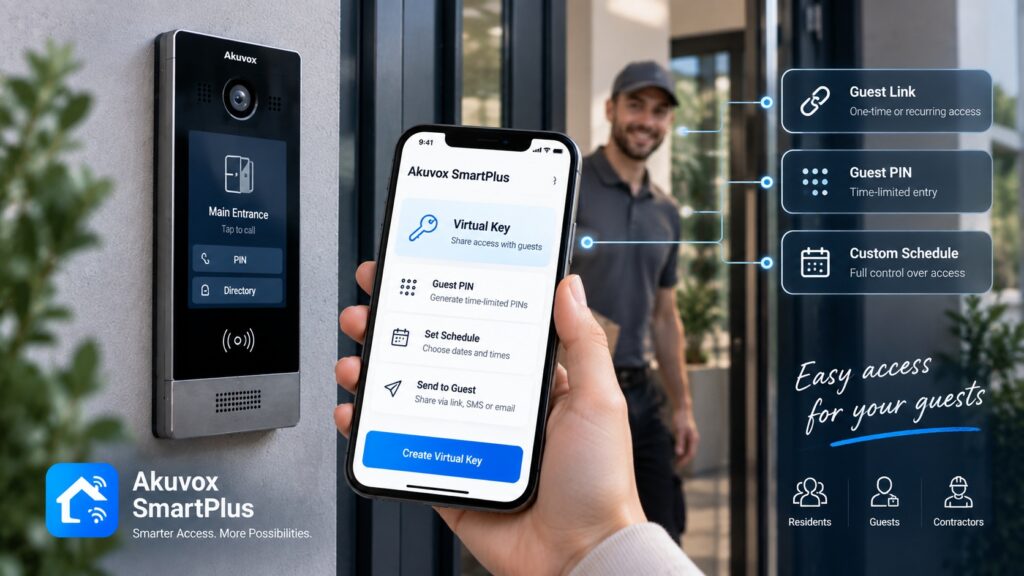
Smartphones can become part of the access experience when the selected Akuvox equipment and platform support mobile credentials.
Instead of carrying a physical card or fob, an authorized user may be able to use a compatible smartphone for supported access functions.
Potential advantages include:
- Reduced dependence on physical credentials.
- Convenient access for residents and employees.
- Easier credential administration.
- Simplified onboarding.
- Support for modern visitor workflows.
Mobile access should not be assumed to work with every Akuvox device. The available functions depend on the specific model, application, platform, and configuration.
Temporary and Scheduled Access
Temporary access can be particularly useful for people who do not need permanent building permissions.
Examples include:
- Contractors.
- Cleaning companies.
- Maintenance personnel.
- Temporary employees.
- Service technicians.
Instead of providing a credential that remains active indefinitely, the property can use supported schedules or temporary permissions.
For example, a contractor working on a building project may need access to a service entrance during an approved period. After the work is completed, the credential can be disabled.
Access schedules can also help separate daytime employees from evening personnel or restrict access to specific amenities according to their operating hours.
Cloud Access Control and Visitor Management
Cloud-based access control can work alongside intercom and video entry systems.
The roles are different:
Resident or employee access → credential-based entry.
Visitor access → intercom communication.
Video → visual verification.
Door release → compatible entrance hardware.
For example, a resident can enter the building using an assigned credential. A visitor can use the entrance station to call the resident, who can communicate with the visitor and release the compatible door when appropriate.
For an office, the same concept can be used with reception or individual employees.
This creates separate processes for people who already have authorization and those who need approval before entering.
Monitoring Access Events
A cloud-connected management platform can provide access information where event logging is supported.
Depending on the system, administrators may be able to review information such as:
- Credential used.
- Access point.
- Date.
- Time.
- Access granted.
- Access denied.
This information can help property managers understand how entrances are being used and investigate access-related questions.
For example, if an employee reports that their credential did not work, an administrator may be able to review the relevant access event information when the platform provides that capability.
The available reporting, event history, and retention functions depend on the selected equipment and software.
Cloud-Based vs. On-Site Access Control
Both cloud-connected and locally managed systems can be appropriate depending on the property.
Cloud-Based Management
Potential advantages include:
- Remote administration.
- Centralized user management.
- Easier management of multiple entrances.
- Convenient credential updates.
- Support for multi-property administration where available.
On-Site or Local Management
A local architecture can be suitable when:
- The property has specific IT requirements.
- Local infrastructure is preferred.
- The installation is relatively standalone.
- Remote administration is not a priority.
The choice should be based on the building’s operational needs, network environment, security requirements, equipment, and management preferences.
Cloud-based access control is not automatically the right choice for every property.
What Happens if the Internet Connection Is Lost?
Internet connectivity is an important consideration when designing a cloud-connected system.
The cloud platform and the physical door equipment have different roles. A network interruption may affect remote administration or cloud communication, while the behavior of the local access hardware depends on the specific controllers, readers, configuration, and system architecture.
For this reason, the project should establish:
- How local controllers operate.
- Which access decisions are handled locally.
- What happens during a network interruption.
- Which management functions become temporarily unavailable.
- How the system reconnects after communication is restored.
These details should be confirmed for the specific Akuvox equipment before installation rather than assumed to be identical across all configurations.
Cloud Access Control and Existing Door Hardware
A cloud platform does not replace the physical components that secure the entrance.
A complete installation may involve:
- Electric locks.
- Electric strikes.
- Magnetic locks.
- Door controllers.
- Exit devices.
- Gate operators.
The selected hardware must be compatible with the doors and with the access control architecture.
Before an upgrade or new installation, the existing locks, power supplies, wiring, network equipment, and gate operators should be inspected.
In some cases, suitable hardware can remain in place. In others, replacing outdated components may be necessary.
Upgrading an Existing Access Control System to Cloud Management
A property with an older access control installation may be able to modernize its management capabilities without replacing every component at once.
A typical upgrade process can include:
- Audit Existing System. Document readers, controllers, doors, locks, wiring, and management equipment.
- Review Controllers and Readers. Determine whether existing devices can support the planned architecture.
- Check Network Infrastructure. Evaluate connectivity, cabling, network equipment, and other relevant infrastructure.
- Determine Compatible Components. Identify hardware that can be retained and components that need replacement.
- Select Akuvox Equipment. Choose new devices based on the required functions and property layout.
- Migrate or Reconfigure Users. Set up residents, employees, contractors, and other authorized users.
- Test Doors and Credentials. Verify normal access, restricted access, visitor functions, and administrative controls.
This approach can provide a structured path from an older installation to a more modern management environment.
How to Choose a Cloud-Based Access Control System
The right configuration depends on more than whether a property wants remote management.
- Number of Users. Consider residents, employees, contractors, management personnel, and other authorized users.
- Number of Doors. Identify every entrance, restricted room, gate, and parking access point that requires control.
- Number of Properties. Management companies with several buildings may have different requirements from a single-property owner.
- Required Access Methods. Determine whether users will rely on cards, fobs, PINs, mobile credentials, or other supported methods.
- Remote Management Needs. Consider how often administrators need to add users, change permissions, or disable credentials from outside the property.
- Access Schedules. Determine whether employees, contractors, residents, or amenity users require different access times.
- Visitor Management. If the property receives visitors, consider integration with intercom and video entry equipment.
- Existing Door Hardware. Check locks, strikes, magnetic locks, gate operators, and exit devices before selecting controllers.
- Network Infrastructure. A cloud-connected solution depends on appropriate network connectivity and should be evaluated alongside the property’s IT infrastructure.
- Future Expansion. Consider whether additional doors, users, buildings, or access zones may be added later.
Cloud-Based Access Control Installation in Staten Island
Akuvox NYC can provide professional installation and configuration for cloud-connected access control projects in Staten Island.
A project can include:
- Property assessment.
- Access point planning.
- Network review.
- Door and gate inspection.
- Hardware compatibility assessment.
- Equipment selection.
- Reader and controller installation.
- Lock integration.
- Cloud platform configuration.
- User and credential setup.
- Access group creation.
- Schedule configuration.
- Intercom integration.
- System testing.
- Property manager or staff training.
- Technical support.
For occupied buildings and active businesses, installation can be organized around the property’s operating schedule to reduce disruption.
Why Choose Akuvox for Cloud Access Control?
Akuvox offers technologies that can bring access control, intercom, video communication, and mobile functions together within a broader entry solution.
Depending on the selected configuration, the system may include:
- Access control terminals.
- Door controllers.
- Card and fob readers.
- Video intercom stations.
- Indoor monitors.
- Mobile access.
- Gate integration.
- Cloud-connected management where supported.
The advantage of this approach is that access and visitor communication can be considered together during system design.
Akuvox NYC can evaluate the property, review the existing infrastructure, identify the required access points, and recommend compatible equipment based on the actual requirements.
Move to Cloud-Based Access Management in Staten Island
Cloud-connected access control can simplify the administration of properties where users, credentials, entrances, and permissions change regularly. It can be especially useful for apartment buildings, offices, commercial properties, and management companies handling multiple access points.
The right solution should be designed around the property’s physical infrastructure and management requirements. Doors, locks, network connectivity, user groups, visitor procedures, and future expansion all need to be considered before equipment is selected.
Akuvox NYC can assess your property in Staten Island, review its existing access infrastructure, determine the required cloud and local components, and provide professional installation and configuration.
Contact Akuvox NYC to discuss your project and develop a cloud-based access control solution suited to your property’s needs.
Other Services in STATEN ISLAND
Other Locations we Serve
FAQ
It is an access control architecture that uses a cloud-connected management platform to provide supported administrative functions remotely. Physical readers, controllers, locks, and other equipment remain part of the entrance system.
Users authenticate at a controlled entrance using a supported credential. The access system determines whether entry is authorized, while the cloud platform provides management and supported administrative functions.
Yes, supported systems can provide remote user and permission management. The exact functions depend on the Akuvox platform, equipment, and configuration.
Compatible Akuvox solutions can support mobile access functions. Availability depends on the specific equipment and platform.
Yes. Users can be organized into different access groups with permissions based on their roles and authorized areas.
Supported configurations can provide scheduled or temporary permissions for contractors and other service personnel.
Centralized management of multiple doors can be supported depending on the selected equipment and platform.
Some configurations can support management across multiple locations. The available functionality depends on the platform and service configuration.
The effect depends on the controllers, equipment, and system architecture. Remote cloud functions may be affected during a connection interruption, while local access behavior depends on how the installed system is designed.
Potentially. Existing electric locks, strikes, magnetic locks, gate operators, and other components should be inspected for compatibility with the selected equipment.
Yes. Compatible access control and intercom systems can be designed together so that authorized users have credential-based access while visitors can communicate through the entrance station.
The cost depends on the number of doors and users, readers, controllers, locking hardware, intercom equipment, network requirements, cloud services, wiring, and installation complexity. A property assessment is needed to prepare an accurate estimate.
How It Works
Consultation & Needs Assessment
We discuss your property, security goals, and operational requirements to understand your specific needs.
Customized Solution Design
Our specialists recommend and design an intercom or access control solution tailored to your home, apartment building, or commercial facility.
Professional Installation
Certified technicians install and configure all system components, ensuring seamless integration and reliable performance.
Ongoing Support & Maintenance
We provide system testing, user training, maintenance, and technical support to keep your solution operating efficiently for years to come.
Get a Quote
Need an access control or intercom system? Tell us about your project and get a tailored solution from Akuvox NYC.
Other Services
Latest Articles