
Virtual Key Intercom: How Guest Keys and PINs Work

You are at work and a friend is arriving early, or a cleaner needs in at 10, or a delivery is coming while you are out. Handing over a physical key or texting the building’s door code solves it badly — those secrets never expire. A virtual key intercom solves it properly, letting a resident grant a specific person entry for a specific window, then take it back automatically. Here is how virtual keys and guest PINs actually work.
We set up these systems across New York, and once residents discover the feature, it quickly becomes the part of the intercom they use most. This guide covers the types, how to issue one, and why it is safer than the old workarounds.
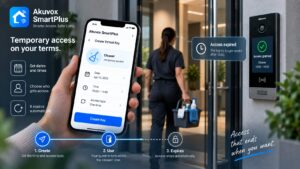
In short, a virtual key is a temporary, app-issued credential — usually a guest PIN, a QR code, or an in-app pass — that lets a visitor open the door for a limited time. The resident creates it in under 30 seconds, shares it, and the system revokes it when it expires.
What a virtual key intercom does
A virtual key replaces the physical handoff with a digital one that the resident fully controls. Instead of copying a key or revealing a permanent code, the resident generates access on demand.
The defining traits are control and expiry. A virtual key can be limited to a window of time, tied to a specific guest, and switched off the moment it is no longer needed. That turns “letting someone in” from a permanent security compromise into a managed, temporary event, which is exactly what a busy household or building needs.
It is a small shift with a big effect on how a building feels. Residents stop hiding spare keys under mats and stop texting the lobby code to half their contacts, because the app gives them a cleaner answer. Access becomes something deliberate and reversible rather than a series of small, permanent compromises.
The types: PINs, QR codes, and app passes
Virtual access comes in a few common forms, and a good system offers more than one so residents can pick what fits.
- Guest PIN: A temporary numeric code, often 4 to 6 digits, that a visitor enters on the door keypad to get in.
- QR code key: A scannable code sent to a guest’s phone that the door panel reads, with nothing to type.
- In-app visitor pass: A digital pass delivered through the app that a guest uses to gain entry.
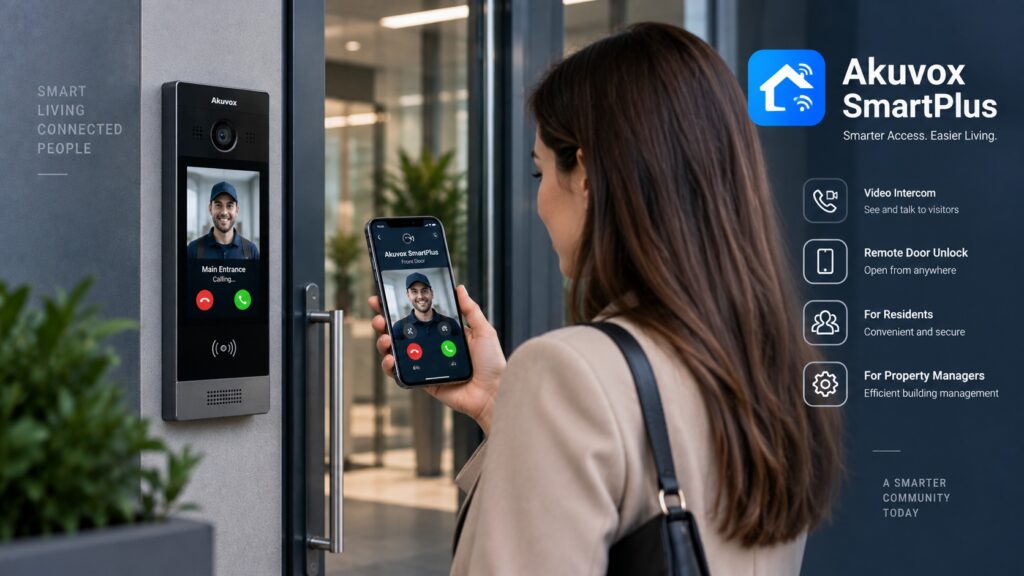
- One-tap remote unlock: For a visitor already at the door, the resident can simply release it from their phone with 1 tap.
How a resident issues one
Creating a virtual key takes only a moment, which is a big part of the appeal. The resident drives the whole thing from the app.
- Open the app: The resident goes to the guest-access feature in their intercom app.
- Set the details: They choose the type of key and the time window it should be valid for.
- Generate and share: The system creates the PIN, QR code, or pass, which the resident sends to the guest by text or message.
- Done: The guest uses it to enter during the window, and no physical key ever changes hands.
Temporary access and expiry
The feature that makes virtual keys genuinely secure is the one a physical key can never have: a built-in expiration. Temporary access means the credential stops working on its own.
A resident can set a key to be valid only for a specific afternoon, only during a cleaner’s regular hours, or only once. When the window closes, the key simply stops working, with nothing to collect and no lingering code floating around. That self-expiring quality is the core security advantage, because the most dangerous credential is the one that outlives the reason it was issued.
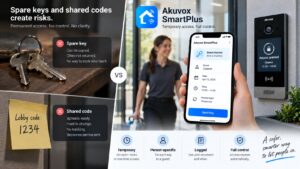
Physical keys and standing codes fail precisely on this point. They have no concept of “until Thursday” or “just this once,” so every one you hand out is permanent until you take active steps to undo it. A virtual key flips the default to temporary, which is a far safer posture for any home or building.
Real-world uses
Once residents have the feature, the uses multiply. A handful come up constantly in real buildings.
- Deliveries: Issue a one-time code so a courier can leave a package inside rather than on the stoop.
- Guests arriving early: Give friends or family a pass valid for the evening so they can wait inside.
- Cleaners and aides: Provide a recurring key limited to set hours, say 9 to 5, for regular help.
- Contractors: Grant a tradesperson a visitor pass for the day of the work, then let it expire.
- Short stays: For an approved guest staying 2 or 3 days, a key scoped to those dates avoids handing over hardware.
Why it beats a spare key or shared code
It is worth being explicit about why virtual keys are safer than the workarounds people default to. The old methods all share one flaw.
A spare key can be copied and is rarely returned, and a shared building code spreads by word of mouth until no one knows who has it. Both create permanent, untraceable access. A virtual key is the opposite: it is temporary, tied to a specific guest, and logged, so the resident always knows what they granted and to whom. When the visit is over, the access is gone, which is something a brass key or a sticky-note code can never promise.
There is also peace of mind in the record. Because each key is tied to a person and a time, a resident is never left wondering who still has a way in. The ambiguity that surrounds physical keys — who copied what, who never gave one back — simply does not exist with access that is issued, logged, and expired on purpose.
Managing and revoking keys
Control does not end once a key is issued. Residents and managers can see and revoke access as needed.
If plans change, a resident can cancel a key before it expires, cutting off access immediately. Because entries are logged, there is also a record of when a key was used, which adds accountability. For property managers, the same approach scales to the building: access can be granted and pulled centrally, so a departed resident or a finished contractor loses entry at once rather than lingering on a list.
Virtual keys and your access system
Virtual keys are most powerful when the intercom and door access run on one platform. On a system like Akuvox with SmartPlus, the guest-access feature ties directly into the building’s entry hardware.
That means the same app that handles video calls also issues the keys, and those keys work on the same readers and door release that serve residents day to day. The result is one consistent system for permanent and temporary access alike, administered together rather than bolted on. For a building, that unification keeps both security and management simple.
It also means the guest-access feature is not a bolt-on gimmick but a native part of how the building runs. The same logs, the same readers, and the same management portal cover residents and visitors alike, so a manager has one coherent picture of access rather than a patchwork of tools that do not talk to each other.
Frequently asked questions
What is a virtual key on an intercom? It is a temporary, app-issued credential — a guest PIN, QR code, or pass — that lets a visitor open the door for a limited time, then expires automatically.
How do I give a guest temporary access? In the intercom app, choose a guest key, set the time window, and share the generated PIN, QR code, or pass with your visitor by message.
Are guest PINs safe? Yes, because they are temporary and tied to a specific visit; unlike a shared building code, a guest PIN stops working when its window closes.
Can I cancel a virtual key early? Yes, a resident can revoke a key before it expires to cut off access immediately, and entries are logged for accountability.
What is the difference between a PIN and a QR code key? A guest PIN is a code typed on the keypad, while a QR code key is scanned by the door panel from the guest’s phone, with nothing to enter.
Want to stop handing out keys and codes? Virtual keys make access temporary and controlled. Explore the SmartPlus app, see our access control service, browse the catalog, or ask us how it works.
Related Articles